


Project Push (Sample Boost)
Project Push, also known as Sample Boost, lets you increase traffic to a live Audience project without closing or relaunching it.
When a project is collecting responses slower than expected, you can invite more respondents for the remaining responses. This helps increase respondent traffic while keeping all responses and reporting under one Audience project.
Click to download the video
Use Project Push when:
- Your project is progressing slowly.
- The project is not collecting responses quickly enough.
- You want to increase respondent traffic without creating a new Audience project.
- You want to complete the project sooner while keeping the same project settings.
To push an Audience project:
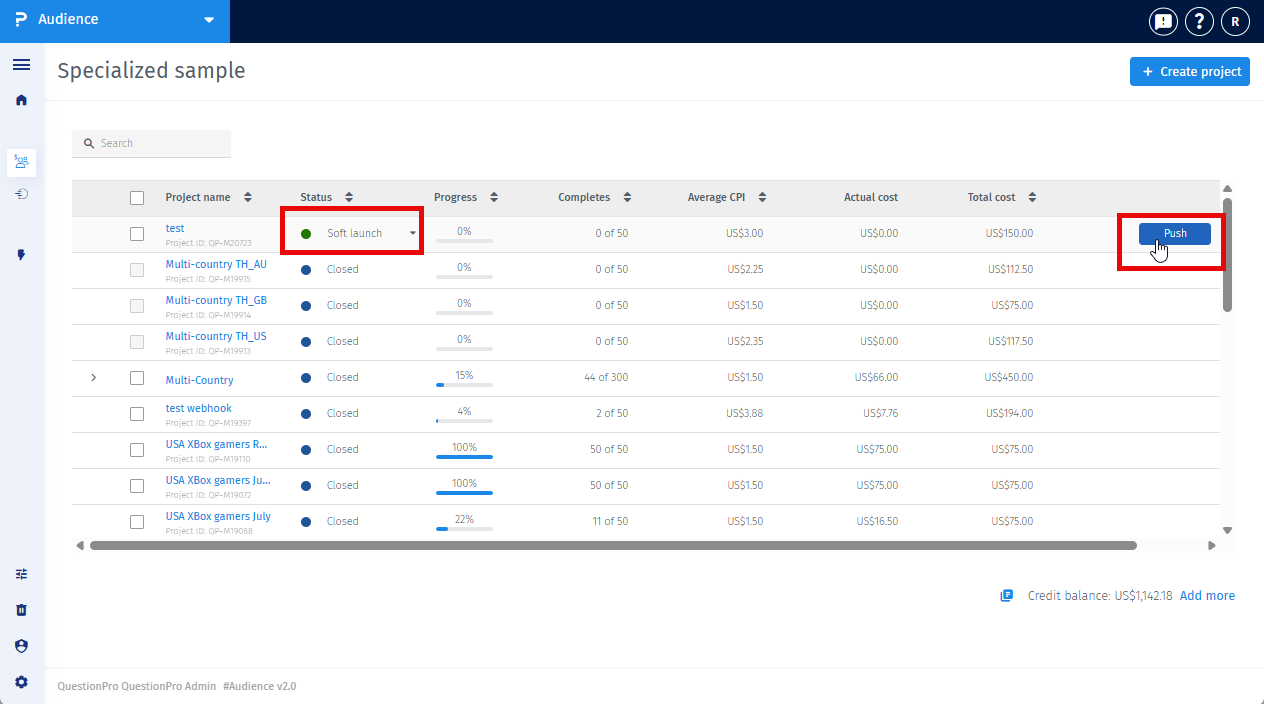
- Go to the Projects page.
- Hover over the project you want to boost.
- Click Push.
- Choose one of the available options: Push at Same CPI or Push at Higher CPI.
- Review the push details and confirm.
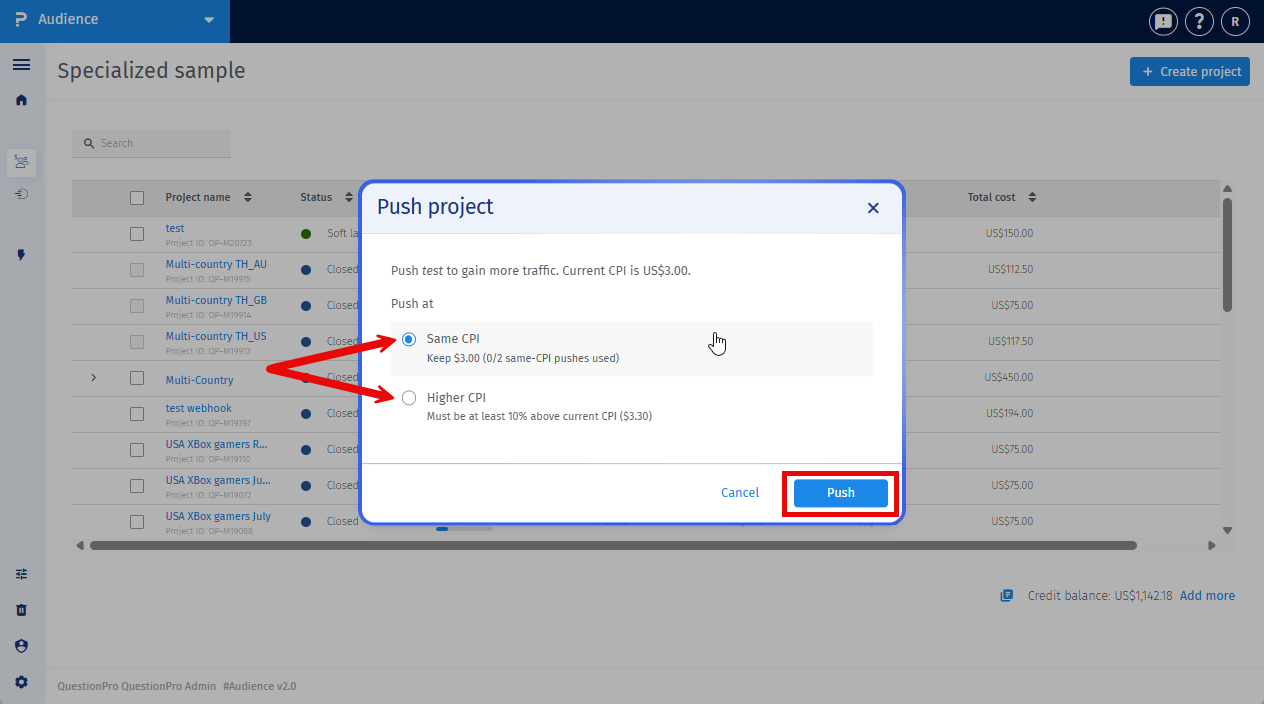
The platform creates an additional project in the backend for the remaining responses while keeping the existing Audience project active.
You can choose from the following options:
- Push at Same CPI – Launches another project using the current CPI and the same project settings. This option is available for the first two pushes on a project.
- Push at Higher CPI – Launches another project using a higher CPI to help increase respondent traffic. The new CPI must be at least 10% higher than the project's current CPI.
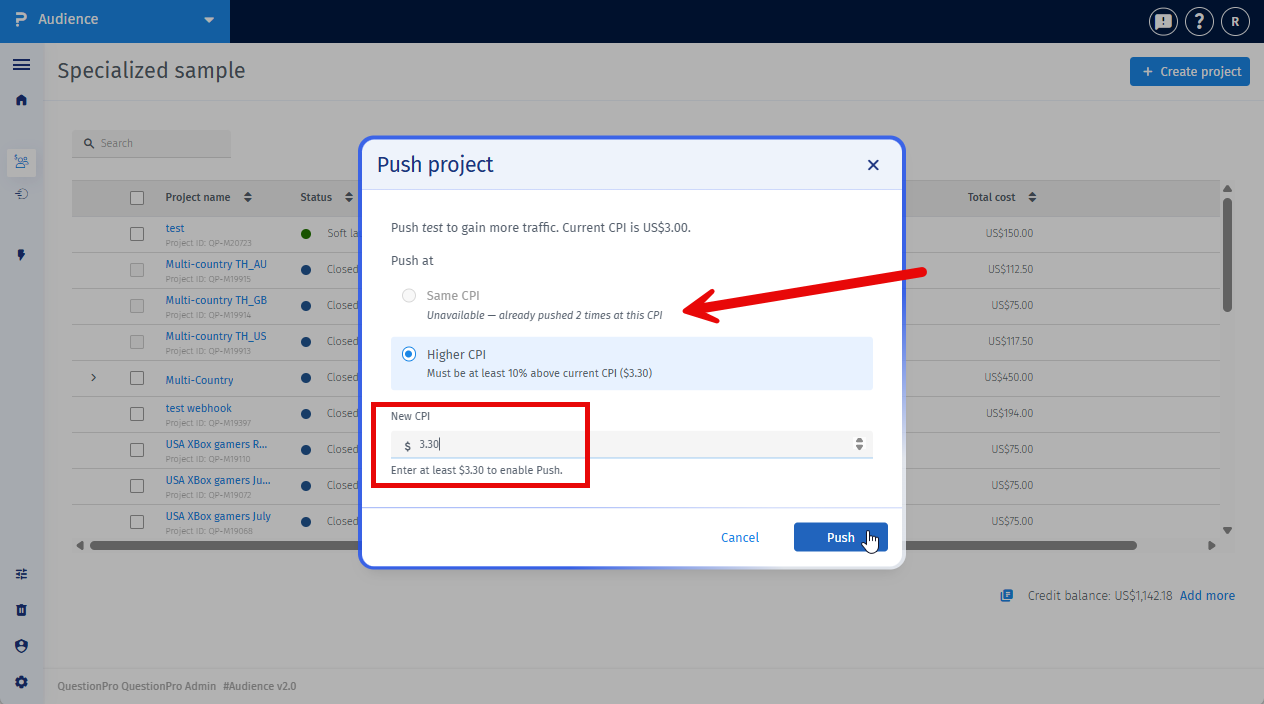
For example, if the current CPI is $2.00, the minimum allowed CPI for a higher-CPI push is $2.20.
Yes. You can connect the QuestionPro MCP to an AI assistant such as Claude, ChatGPT or Cursor. Then you can ask it in plain words to find slow projects and push them for you.
Step 1: Add the QuestionPro MCP to your AI assistant
- Open the settings of your AI assistant and go to the section for connectors or MCP servers.
- Add a new custom connector or MCP server.
- Enter a name, for example QuestionPro, and the server URL https://mcp.questionpro.com/all.
- Save it. When asked, sign in with your QuestionPro account and allow access.
- Check that the QuestionPro tools are turned on in your assistant.
Step 2: Find projects that are falling behind
Ask your assistant to check your live projects. For example:
- Show my live Audience projects that are behind schedule.
- Which of my live projects have collected the fewest responses compared to their target?
The assistant lists your live projects with the responses collected, the responses needed and the completion date. This helps you see which project needs a push.
Step 3: Ask the assistant to push the project
- Ask your assistant to push a project. For example: Push project 12345.
- The assistant first checks which push options are available for that project. It shows you whether Push at Same CPI is still available, and the lowest CPI you can use for Push at Higher CPI.
- Tell the assistant which option you want. For a higher CPI push, also tell it the new CPI. For example: Push it at a higher CPI of $2.50.
- Confirm when the assistant asks. It pushes the project and shows you the result.
The same rules apply as in Audience. You can push only Live projects, Push at Same CPI is available for the first two pushes, and a higher CPI must be at least 10% above the current CPI.
After a project is pushed:
- A new project is created using the same targeting and qualifications.
- Only the remaining required responses are requested.
- Existing projects continue collecting responses.
- Responses from all projects are automatically combined in the same Audience project.
- You continue managing one Audience project while the platform tracks all launches in the background.
Closing the Audience project automatically closes all associated projects.
No additional action is required.
Yes. The Audience platform tracks the project associated with each response.
This allows reconciliation requests to be processed accurately, even when responses come from different projects.
The Push at Same CPI option is available only for the first two pushes on a project.
After the first two pushes, you must increase the CPI by at least 10% to continue boosting the project.
No. Only one Audience project exists.
The platform creates additional projects in the background while keeping all responses, reporting, and management under the original Audience project.
No. The new project uses the same targeting, qualifications, quotas, survey settings, and other project configurations.
The only change is the CPI when you select Push at Higher CPI.
No. All associated projects remain active until the Audience project is closed.
The Audience platform automatically tracks all projects associated with your Audience project.
These projects are managed internally, so you can work with one Audience project while the platform handles the panel-side launches.
